
SMARC

What Is a SMARC Carrier Board? Architecture, Interfaces and Choosing the Right One?

Home Blog SMARC What Is a SMARC Carrier Board? Architecture, Interfaces and How to Choose the Right One Published On: 30 October 2026 Table of Contents A SMARC module can provide an embedded system with its core computing functionality. A carrier board is used to interface with external devices, peripherals and other parts of the system. Choosing the correct SMARC carrier board is a key part of creating a reliable solution. In this article, we will talk about what a SMARC carrier board is, how the SMARC module interacts with the carrier board and what interfaces are available. Key Takeaways •  A SMARC carrier board connects a SMARC module to external devices. •  The SMARC module contains the processor, memory, and main computing parts. •  A standard 314-pin connector links the SMARC module to the carrier board. •  The carrier board provides connections for displays, USB, Ethernet, storage, and other devices. •  Not all SMARC carrier boards support the same interfaces. •  Check module compatibility, power needs, cooling, and expansion options before choosing a carrier board. •  The right carrier board helps build a reliable embedded computing system. What Is a SMARC Carrier Board? A SMARC carrier board is used as a baseboard to interface external components and interfaces with a SMARC (Smart Mobility Architecture) computer-on-module. The SMARC module holds all of the core computing components such as the processor, memory and other crucial circuitry. The carrier board provides the connectors, power circuits and interfaces needed to integrate everything together into a complete embedded system. In simple terms: SMARC Module: Provides the processing functionality. SMARC Carrier Board: Connects the module to external devices, power, displays, storage and communication interfaces. How Does a SMARC Module Work with a Carrier Board? An embedded system using a SMARC module usually consists of two main components. The SMARC module is connected to the carrier board using a standard 314 pin connector. This allows the processor and other components on the module to interact with the interfaces on the carrier board. The carrier board then sends the required signals to the external connectors based on the design of the system. The basic architecture would be: SMARC Module: Processor, memory, core components. Connector: Electrical connection between the module and carrier board. Carrier Board: Sends power, data, and control signals to the correct interfaces. External Peripherals: Displays, storage, network connections, sensors, and other application-specific components. This design makes it easier for the developer to choose a suitable computing module. As well as designing or choosing a carrier board that suits their application. What are the Interfaces Available on a SMARC Carrier Board? The interfaces available on a SMARC carrier board depend on its design, the SMARC module and the selected processor platform. Common interface categories include: 1. Display Interfaces Display interfaces allow the embedded system to connect with monitors, industrial displays and human-machine interface (HMI) panels. Depending on the module and carrier board design, display connectivity may include: LVDS eDP HDMI or DisplayPort, where supported by the platform These interfaces are useful in industrial HMI systems, medical equipment, digital signage and other display-based applications. 2. USB Interfaces USB interfaces connect external peripherals such as cameras, keyboards, touchscreens, storage devices and other USB-enabled equipment. The supported USB versions and number of ports depend on the module’s capabilities and carrier board implementation. 3. Ethernet Connectivity Ethernet interfaces provide wired network connectivity for communication between embedded systems, industrial equipment, servers and other network devices. They are commonly used in industrial automation, IoT gateways and network-connected embedded applications. 4. PCIe Expansion PCI Express (PCIe) provides high-speed connectivity for compatible expansion devices. Depending on the available lanes and board design, PCIe can support expansion cards, communication modules and other application-specific components. 5. Storage Interfaces Storage interfaces allow the system to connect with supported storage devices. Depending on the platform, these may include SATA, SD and other supported storage options. The actual availability should be checked against the module and carrier board specifications. 6. Serial and General-Purpose Interfaces Serial interfaces and general-purpose input/output (GPIO) signals support communication with sensors, controllers and external equipment. Common examples include UART, I²C, SPI and GPIO. These interfaces are particularly useful in industrial control, monitoring and automation applications. SMARC Carrier Board vs SMARC Module: What Is the Difference? Although the SMARC module and carrier board work together, they serve different purposes in an embedded computing system. Parameter SMARC Module SMARC Carrier Board Parameter SMARC Module SMARC Carrier Board Main purpose Provides computing power Provides connectivity and system integration Components Processor, memory and core circuitry Connectors, power circuits and interface routing Connectivity Exposes signals through the module connector Routes signals to external interfaces Design focus Computing performance and module capabilities Application-specific connectivity and integration Selection factors Processor, memory, performance and power Interfaces, connectors, power input and application requirements The module determines the core computing capabilities, while the carrier board determines how those capabilities are connected to the rest of the system. How to Choose the Right SMARC Carrier Board Choosing a SMARC carrier board requires more than checking the number of available connectors. It is important to understand the complete system requirements and confirm compatibility with the selected module. Here are six factors to consider. 1. Check SMARC Standard and Module Compatibility Start by checking whether the carrier board is designed for the SMARC module you plan to use. Verify the connector, mechanical dimensions, pinout and supported signals. Also check the applicable SMARC specification and module documentation. A standardized connector does not automatically mean every module and carrier board combination will support every feature. 2. Identify the Required Interfaces List the interfaces required by your application before selecting a carrier board. For example: Industrial HMI systems may require display, USB and Ethernet connectivity. IoT gateways may require Ethernet, serial communication and expansion options. Industrial automation systems may require GPIO, UART and other control interfaces. Select a carrier board that supports the required signals and connectors without adding unnecessary complexity. 3. Evaluate Power Requirements Power requirements should be checked

What Is a SMARC Carrier Board? Architecture, Interfaces and Choosing the Right One? Read More »
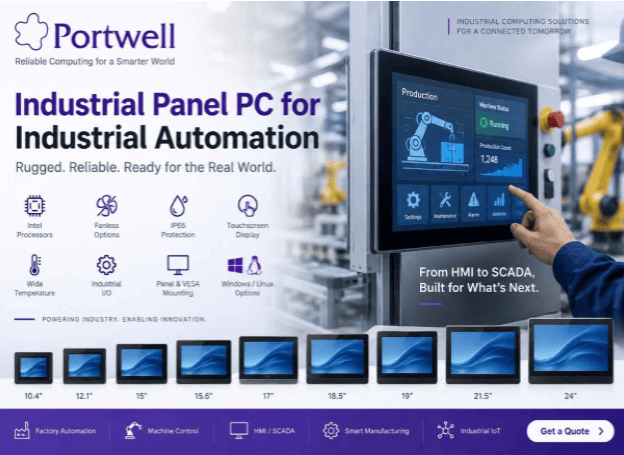
Industrial Panel PC for Industrial Automation

Home Blog Industrial PCs Industrial Panel PC for Industrial Automation Published On: 30 October 2026 Table of Contents Quick Answer: An industrial panel PC for automation is an all-in-one computer with a built-in industrial touchscreen, used for HMI, SCADA, machine control and factory monitoring. It combines computing and display in a single integrated unit, eliminating the need for a separate PC and monitor on the factory floor.  Portwell India offers panel PC configurations from 10.4″ to 24″, with fanless, IP65-rated, and wideoperating-temperature options depending on the model. Introduction Modern factories need reliable computing systems to monitor machines, display production information, and help operators make quick decisions. An Industrial Panel PC for Automation brings computing, display, and touchscreen functionality together in a single system. Portwell industrial panel PCs are designed for applications including factory automation, machine control, HMI, SCADA, process monitoring, smart manufacturing, and Industrial IoT. Depending on the model, they offer Intel processor options (Celeron through Core i5/i7-class), resistive or PCAP touchscreen displays, fanless cooling, IP65-rated front protection, industrial I/O, wide operating-temperature support, and panel or VESA mounting. Key Takeaways • Industrial Panel PCs combine computing power and touchscreen displays in one system. • They help operators monitor machines, control processes and view production data. • Fanless designs can reduce dust intake and maintenance needs. • IP-rated protection helps protect the front panel against dust and water. • Multiple screen sizes help meet different industrial display needs. • Industrial I/O supports connections with machines, sensors and other devices. • Windows and Linux options support different industrial software needs. • The right Industrial Panel PC can improve machine monitoring and factory operations. What Is an Industrial Panel PC for Automation? An industrial automation panel PC is a computer with an integrated industrial display and operator interface. It allows users to run industrial software and interact with machines and processes from one device. The panel PC can display machine status, process values, alarms, production data, and equipment performance, making it useful for HMI, SCADA, machine monitoring, and control applications. Why Use a Panel PC in Industrial Automation? A conventional computer and separate monitor can require additional installation space and connections. A panel PC combines these components into one integrated platform: Integrated computer and display in a single unit, which saves panel space Direct operator interaction via touchscreen Industrial-grade connectivity (LAN, COM, USB, HDMI, DisplayPort) Flexible installation: panel mount or VESA mount Application-specific configurations for HMI, SCADA, or monitoring What are the features to consider? Industrial Touchscreen PC Provides direct operator interaction with HMI, SCADA, and machine control applications. Resistive touchscreens work well with gloved hands and in wet conditions; PCAP (capacitive) touchscreens offer smoother multi-touch response and are often preferred in cleaner, high-vibration environments. Fanless Industrial Panel PC Uses passive cooling instead of a mechanical fan. This reduces moving components, lowers noise, and reduces dust intake from forced air  a common advantage in dusty factory environments. IP65 Panel PC Selected Portwell models provide IP65 rated front protection, meaning the front panel is dust-tight and protected against low-pressure water jets from any direction, per the IEC 60529 international standard. The exact rating should always be verified for the selected model and installation. Industrial Processors Processor selection should match the software and workload, from Intel Celeron for basic HMI display tasks, up to Intel Core i5/i7-class processors for SCADA, visualization, analytics, or edge-computing workloads. Industrial I/O Depending on the model, connectivity can include USB, LAN/RJ45, Serial/COM, HDMI, DisplayPort, VGA, and other interfaces. What are the available industrial panel PC screen sizes? Portwell offers panel PC configurations in different display sizes for different industrial applications: Screen Size Typical Application 10.4″ Compact machine interface 12.1″ HMI and machine control 15″ Factory automation 15.6″ Production monitoring 17″ Industrial control 18.5″ Monitoring 19″ SCADA and control 21.5″ HMI dashboards 24″ Large visualization Industrial Panel PC Applications Factory Automation: Monitor machine status, production quantities, process parameters, alarms, and equipment performance HMI—Run: Human-Machine Interface applications with a touchscreen interface for machines and processes SCADA: Display real-time process information, trends, alarms, and equipment status MachineControl: Provide a local interface for automated machinery, depending on the control architecture Smart Manufacturing Support: Production monitoring, data visualisation, equipment monitoring, and edge applications Industrial IoT: Provide a local interface for connected machines, sensors, and IIoT applications Industrial Panel PC vs Industrial PC vs HMI An industrial PC primarily provides industrial computing, while an industrial panel PC combines computing and display in one system. An HMI is primarily designed to provide an operator interface for industrial control systems, while a panel PC is a complete computer that can run a broader range of software. Feature Panel PC Industrial PC HMI Integrated display Yes No Yes Full operating system Yes Yes Limited Multiple applications Yes Yes Limited Best suited for All-in-one operator interface Backend / edge computing Basic operator control Consider a panel PC when you need a full operating system, multiple applications, greater computing flexibility, more storage or processing capability, and integrated touchscreen computing in one unit. How to Select an Industrial Panel PC for Automation Application: Identify whether the system will be used for HMI, SCADA, machine control, factory automation, monitoring, or industrial IoT Processor: Select performance according to application software and workload Screen Size: Consider viewing distance, available space, and information requirements RAM and Storage: Select sufficient memory and SSD capacity for the operating system, applications, and data Touchscreen: Choose resistive or PCAP technology based on operator and environmental requirements IP Protection: Verify the required protection level for dust and water exposure Operating Temperature: Compare expected site conditions with the specified operating range I/O and Mounting: Confirm interfaces, panel cutout dimensions, and VESA requirements Field Experience: Typical Deployment Scenario In field installations, a packaging or production line replacing a separate PC-and-monitor setup with a fanless, panel-mounted industrial PC typically reduces control-panel footprint and removes the maintenance burden of fan filters in dusty environments. Operators in high-vibration areas generally report more consistent touch response with PCAP screens compared to resistive alternatives. Actual results vary by installation, application software, and environmental conditions Portwell India can help assess configuration fit for your specific site. Industrial Panel PC Price in India The industrial panel PC price in India depends on the complete configuration. Factors include screen size, processor, RAM, SSD/storage, touchscreen technology, IP protection, operating temperature, I/O, mounting, operating system, and customization. A compact HMI system can have different requirements from a larger panel PC used for SCADA or advanced industrial applications. For an accurate price, request a quotation with your application details (screen size, environment, and I/O needs) — Portwell India will respond with a configuration and quote based on your requirements. Industrial Panel PC Supplier in

Industrial Panel PC for Industrial Automation Read More »

Comparison of Qseven, COM Express and SMARC Computer-on-Module standards

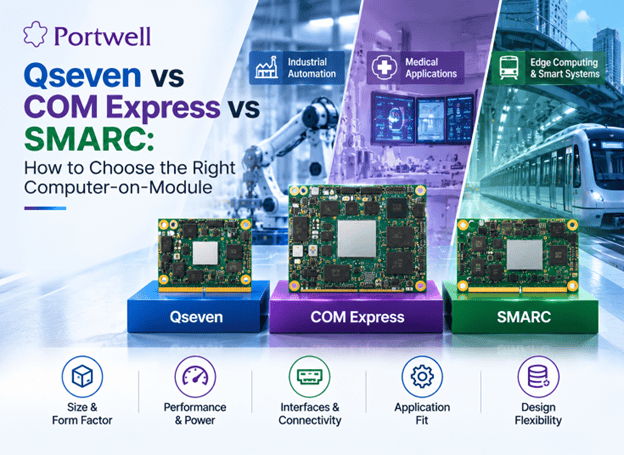
Qseven vs COM Express vs SMARC: How to Choose the Right Computer-on-Module

Home Blog Qseven blogs Qseven vs COM Express vs SMARC: How to Choose the Right Computer-on-Module Published On: 22 October 2026 Table of Contents Choosing the right Computer-on-Module (COM) is an important factor when designing an embedded system. The module affects the size of the system, its connections, power consumption, heat and upgradeability.  Qseven, COM Express, and SMARC are three standards used in embedded computing. Each has its own size, connector, and design features. Knowing the differences can help engineers, OEMs and product creators to select the right one. Qseven is designed around a compact module format, COM Express offers multiple form factors and interface options, and SMARC targets compact embedded designs with an emphasis on low power This guide compares Qseven, COM Express, and SMARC. It outlines their key differences and what to look for when choosing a module for an industrial or embedded system What Is a QSeven Module?  Qseven is a Computer-on-Module standard for compact embedded designs. The module connects to a compatible carrier board, while processor options and supported interfaces depend on the specific model.  Features of Qseven Size: The Qseven Module is available in 70 × 70 mm and 40 × 70 mm sizes.  Connector: Qseven Modules use a 230-pin MXM connector.  Design: Qseven Modules can work with a compatible carrier board.  Range of uses: Qseven Modules can be used in devices and other embedded products.  Product choice: Processor types and features available depend on the Qseven module.  Hence, a QSeven computer on a module can be a choice for designs that need a small module and a clear path for future upgrades.  I always recommend checking the Qseven Module’s processor, ports, power needs, and software support before making a choice. What Is COM Express? COM Express is a Computer-on-Module standard developed by the PCI Industrial Computer Manufacturers Group (PICMG).  It supports a range of embedded computing needs. Different COM Express types and sizes offer different layouts and connection options. This gives designers more choice when building systems for demanding tasks.  Features of COM Express Several sizes: Common sizes include Mini, Compact, Basic, and Extended.  Different module types: Connector layouts and available signals depend on the COM Express type.  Wide range of uses: It can support industrial control, medical devices, and other embedded systems.  Flexible design: A compatible carrier board provides the ports needed by the final product.  Scalable computing: Different modules may offer different levels of processing power.  COM Express may suit projects that need more processing power or a wider range of connections. The right choice depends on the required features, board space, power use, and budget.  Before choosing a module, check its exact COM Express type. The module and COM Express carrier board must use compatible layouts and signals. What Is SMARC? SMARC stands for Smart Mobility ARChitecture. It is a Computer-on-Module standard maintained by SGET.  SMARC is designed for compact, low-power embedded systems. It is often used with Arm-based processors, although the processor choice depends on the available module. Features of SMARC  Compact design: Common module sizes are 82 × 50 mm and 82 × 80 mm.  Standard connector: SMARC uses a 314-pin edge-finger connector. Low-power focus: Many SMARC designs suit systems with tight power limits.  Small footprint: Its size can help when board space is limited.  Flexible applications: It can be used in devices such as control systems, gateways, and other embedded products.  SMARC may be a good option when size and power use are key concerns. Check the processor, memory, interfaces, cooling needs, and software support for each module.  Qseven vs COM Express vs SMARC: Key Differences The three standards support modular embedded computing, but they differ in size, connectors, and design goals. Choose a Computer-on-Module by matching the processor, board space, interfaces, power and cooling limits, and carrier-board compatibility to your application’s requirements. Feature Qseven COM Express SMARC Standard body SGET PICMG SGET Main design focus Compact embedded systems A wide range of computing needs Compact, low-power systems Common module sizes 70 × 70 mm; 40 × 70 mm Mini, Compact, Basic, Extended 82 × 50 mm; 82 × 80 mm Connector 230-pin MXM Depends on module type 314-pin edge-finger Processor options Depends on module Depends on module Often Arm-based; check each model Connections Depend on module and carrier board Depend on module type and carrier board Depend on module and carrier board Best starting point Small designs with suitable module support Projects with specific computing and I/O needs Compact designs with tight power limits Not Sure Which Computer-on-Module Fits Your Design? Compare your processing, interface, power, and space requirements with Portwell’s team. Get Expert Guidance How to Choose the Right Computer-on-Module? There is no one universal best standard to use in all applications. It all depends on the requirements of your particular product.  Consider these criteria before making your decision. 1. Application review Identify all the functions your product is going to perform first.  For instance, a basic controller may require less computing power compared to a machine vision system that requires more advanced graphic or AI support.  Document the main functions your product is going to perform before module comparison. 2. Module size and space for a board Calculate the dimensions of the free space available in your product. Consider the size of the module, the area for connectors and cooling elements.  Qseven SOM and SMARC are small modules, whereas the COM Express has a variety of form factors. Evaluate the entire design, not the size of the module itself. 3. Selection of the right processor A processor defines the performance characteristics of the system such as speed, power consumption and capabilities.  Evaluate the following parameters:  Processor type and speed Number of cores Memory capacity Graphic or AI support, if necessary Operating system support  Select a processor that meets your needs without additional unnecessary features. 4. Required Interfaces Depending on your project your product may require Ethernet, USB, PCIe, display interface and others.  Make a list of all ports and signals required by your product and

Qseven vs COM Express vs SMARC: How to Choose the Right Computer-on-Module Read More »

Sales Request
Sales Request
Subscribe Portwell Newsletter
Enquire Now
Enquire Now
Enquire Now
Enquire Now
Talk to us
Enquire Now
Scroll to Top